A film studio on an infinite canvas.
Cinevas puts script, characters, shots, generated footage and the cut on one canvas. Text becomes images, images become shots, shots become a film. Your projects stay on your own disk; generation runs in the cloud when you ask for it.
Free account with 5 generation credits a month. No credit card to start. Works offline for 14 days at a time.
Cinevas 0.2.0, September 2026. Models run on RunningHub; your machine renders previews, edits and the final export.
Three rooms, one project.
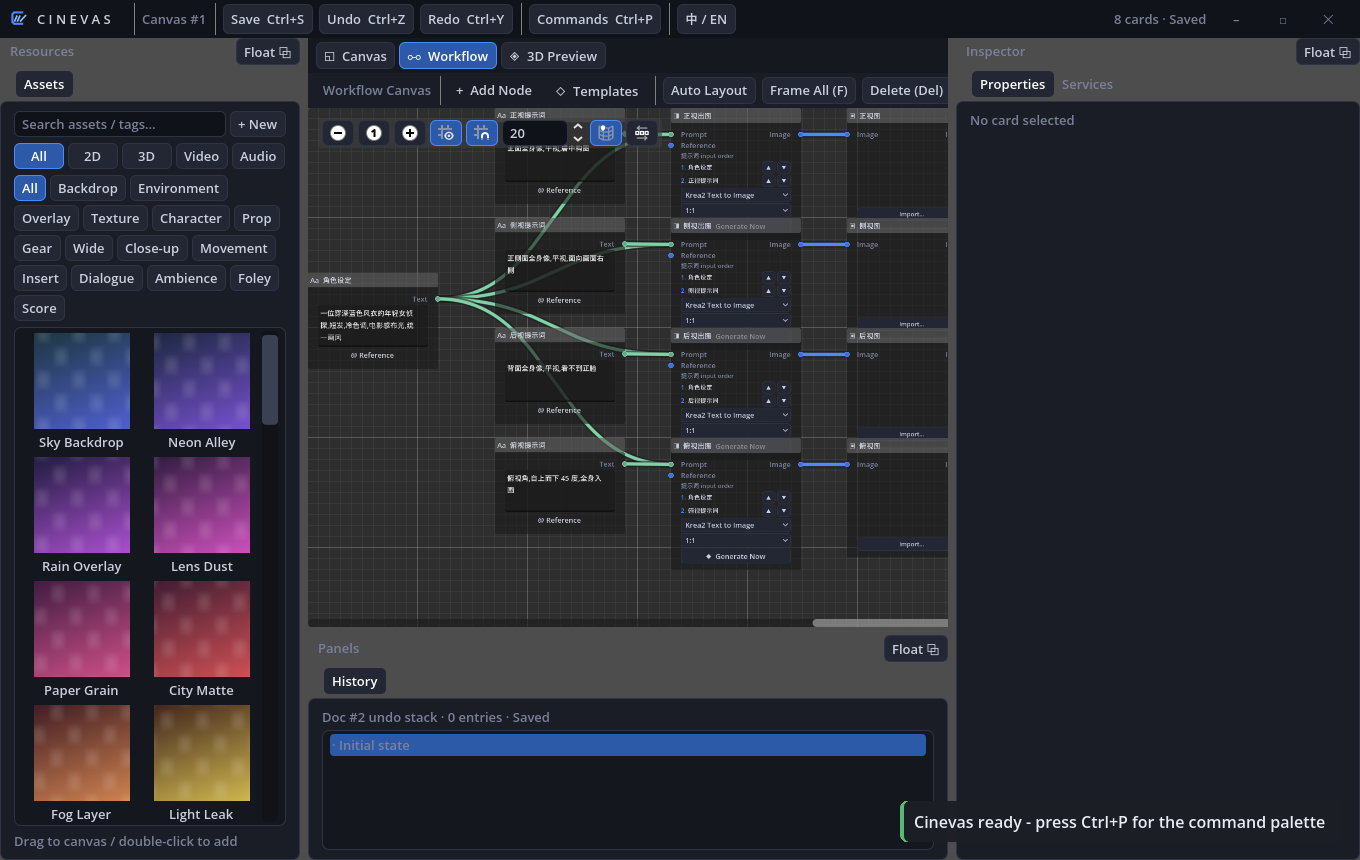
The canvas, the workflow and the editing table read and write the same project folder, so a shot you generate is already in the library, already on the timeline, already yours.
Canvas and library
An infinite canvas for cards of every kind: stills, 3D rigs, video, audio. Drag from the library, arrange, annotate, tint. An inspector that builds itself from each card's properties, and a history panel that undoes per document.
- Panels float out into real OS windows and dock back
- Mask brush for inpainting: paint the region, describe the change
- Command palette (Ctrl+P) reaches every action
Workflow
A node graph where a prompt fans out into shots. Start from a template — character sheets, storyboards, 60- and 90-second story films — or describe the film in one sentence and let the graph build itself. Every node shows its credit cost before it runs.
- Text to image, image edit, four-view character turnarounds, 360° panoramas
- Text and image to video, reference-driven motion, lip-sync to a voice track
- Foley and music for the cut
Editing table
Four tracks, transitions, speed ramps, keyframed transforms, fades. Transcribe a voice track and get word-level captions aligned to the pauses. Export a finished MP4 through ffmpeg in a single pass, on your machine.
- Video proxies and waveforms are pre-extracted so scrubbing stays smooth
- Programmatic 3D characters with six actions for blocking a scene
A desktop tool first. The cloud is a rented camera.
Most AI video products are a web page with a queue behind it. Cinevas is a program on your computer that occasionally sends a prompt out and gets a file back.
01Your files stay on your disk
Projects, assets and exports live in a folder you can open in Explorer. Nothing is synced to a cloud and nothing is needed from one to open your work. The account server does two things: sign you in, and keep count of credits.
02Credits are charged up front and refunded on failure
A generation is charged before it starts, so ten simultaneous requests cannot run the meter past zero. If the model fails or you cancel, the credits come back automatically. Every charge and refund is a line in a ledger you can ask us about.
03Offline is a state, not an error
Once signed in, the app opens without a network for 14 days and keeps your plan. Only generation needs the connection. "Cannot reach the server" and "session expired" are different messages, because they need different fixes.
04Leaving is one click
Cancel from inside the app; access runs to the end of the period you paid for. The first payment of a new subscription is refundable in full within 14 days, no questions asked.
"Text becomes images, images become shots, shots become a film — and the film is on your disk." The whole product, in one sentence.
One number per workflow, shown before you run it.
Credits reset every billing period. Longer and heavier workflows cost more; the table is the same one the app reads.
| Workflow | Output | Credits |
|---|---|---|
| Text to image · image edit | One still | 1 |
| Foley · music | One audio clip | 1 |
| Character turnaround · 360° panorama | Four views · one 4K panorama | 2 |
| Text or image to video | 5–10 second clip | 2 |
| Reference-driven motion · lip-sync · 15-second travel | One clip | 3 |
| Story films (60 s, 90 s), director's cut | A multi-shot film | 10 |
Uploads of your own reference material (a few MB per job) pass through the account server; finished files download straight from the model host to your machine.
A 90-second short on Standard
Character sheet (2) + eight stills to pick a look (8) + one 90-second story film (10) + a music bed (1) = 21 credits, about a fifth of the month. The remaining 79 are for retakes.
Free accounts get 5 credits a month: enough to make a few stills and one short clip before deciding.
The studio is free. Generation is metered.
Everything that runs on your machine — canvas, library, timeline, export — costs nothing. A subscription buys credits for the models.
- The whole desktop app, no watermark
- 5 generation credits a month
- 14-day offline grace
- 100 generation credits a month
- All 13 workflows, including story films
- Unused credits reset each period
- 500 generation credits a month
- Everything in Standard
- For people cutting several films a month
During the preview, paid tiers are granted by hand — write to us with the email you signed up with. When billing opens it will run through Stripe, managed from inside the app, with the first payment refundable in full within 14 days. Prices in US dollars.
Cinevas 0.2.0
Windows 10 and 11, 64-bit. Installs to your user profile without administrator rights. Sign in or create an account on first launch.
Windows
Zip containing the installer. Unzip, then run Cinevas-Cloud-Setup-0.2.0.exe. ffmpeg is bundled; no other runtime is needed.
Cinevas-Cloud-0.2.0-Windows.zipFirst launch
The installer is not yet code-signed. Browsers may warn about the bare .exe (use the zip), and Windows SmartScreen shows "Windows protected your PC" on first run: click "More info", then "Run anyway". Compare the checksum on the left if you want to be sure of what you downloaded.
Account
Create an account in the app with an email and a password. Manage your plan and credits from the same screen; the account service is at auth.cinevas.onepbdc.com.
Terms of service